
URLs and Hosted Resources
This section outlines a few things, I’m still unsure if they go together.
A URL can be created from a domain name or an IP, but a URL also points to a host as the resource needs to “live” somewhere. So in my mind, understanding a URL and where that could be located (such as an on-premises or cloud server) go together. This is an avenue to “expand the attack surface”.
We now understand domains, so what happens next? Sometimes people want to host something online so others can view a website, download a file or play a game. Some companies host these files for other people, so we get into the realm of hosted servers vs something self-managed.
How do we get a URL? Let’s say we have google.com, we now have a Uniform Resource Identifier (URI). It’s something that has a pattern and I can go find it. There are others that exist in the world, like ISBN’s. A more specific description would be to tell us how we can find that resource, for example by using a protocol like HTTP.
So we get http://google.com, we now have a URL. Several URL’s could exist, hosting an array of data, communications, and possibilities of routing information between services.
Daniel Miessler does this explanation better here: https://danielmiessler.com/p/difference-between-uri-url/
A Uniform Resource Locator (URL)
- some people call a URL a URI, depending on how you define these
https://google.com- I define a URL to contain a URI, a URI is the resource and a URL includes how to locate or find the data, by including the protocolgoogle.com- a URI, which identifies the resource but hasn’t defined how we locate it- when you find a domain name, you can start testing for locations of content
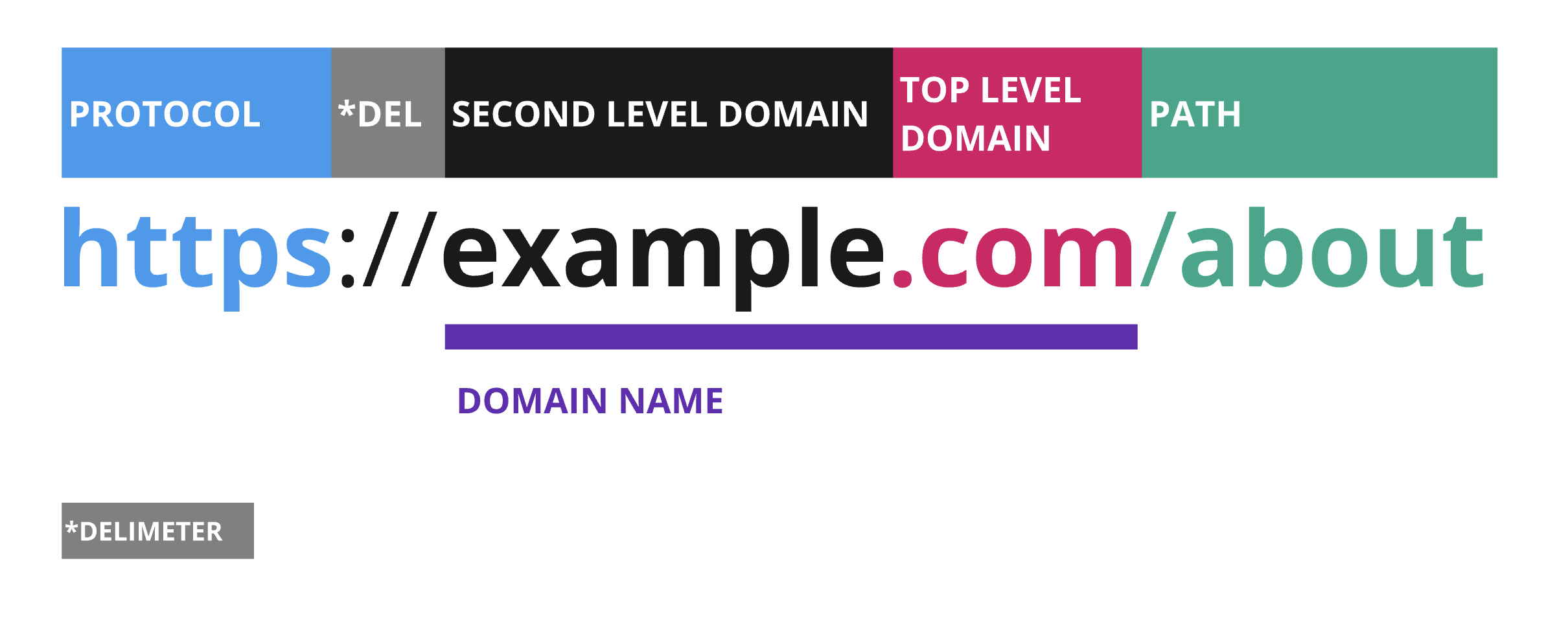
The :// is a delimeter between the protocol and the web address. The double slash is Sir Tim Berners-Lee’s biggest mistake - at least according to him, “it seemed like a good idea at the time”.
The protocol, or scheme, is important. Generally speaking, if you are browsing “the internet”, you’re probably browsing sites using the HTTPS (or HTTP) protocol, but you might also see others like FTP, MQTT, LDAP and more.
Understanding the protocol means you have an understanding on how you might be able to communicate or use this resource, to check if it exists and if there is more information you can find there. You might need to structure a message a certain way to get a response, further information such as the functions and parameters, authentication, authorisation and more will determine how to interact with the protocol. Some protections might come later, and it’s best to test it anyway because sometimes what specifications might tell us about what something should do, how it’s been implemented can vary greatly.
File paths and File extensions
In the below image, you can think of the path “about” as a folder or directory on your system. Directories can hold files, so our next interest is looking at what files might be accessible to us. Don’t forget to keep track of the names and references we find, these can give some clues about how they work internally - for example, how programmers may name certain variables, how files might be named if we wanted to enumerate and find more, or how the company servers might be named. The names can sometimes give you clues to what information that file might have, or internal naming schemes (they could be codenames for projects, for example).

While we have touched on it, we didn’t start with the Client-Server model. This model is fundamental in understanding the Request-Response messaging pattern that you’ll often see with HTTP/HTTPS communications. We’ll cover more in the anatomy of a HTTP Request and Response.
Sub-Domains
When we visit a website, usually we visit “www” - but did you know that this is a subdomain?. Depending on how the website routing is configured, www.example.com subdomain could point to the same content as example.com.
Different websites structure their data differently too. It’s generally a business or “people” decision - something that needs to be considered and then set up. It can be formally defined, ad-hoc, and can even vary in how it’s done within the same company. It’s entirely up to them what kind of convention they come up with, it just comes with different benefits.
https://about.example.com
In the above URL, the about appears before the domain name, this is the sub-domain.
You might notice that it looks different to the path and file extension. Both are valid ways to structure data, it just depends on needs. What’s important for us is knowing that they are different, which opens up how many permutations - or how many possible ways - there is to go through the data, what is the most efficient way, vs what it is we are actually looking for. There might be some simple ways to find some of this information thanks to what the backend sends to the frontend.
Look out for:
- file types, programming languages - like .js for javascript
- file names with a certain pattern / string, like passwords.xls
What you will generally find sent to the client:
- html, styling pages
- some javascript, routes for the page
- anything rendered in the client or designed for client efficiency, so it might do some checks or calculations client-side
- commented out code
- trackers to sites for various metrics, such as for marketing, usage of the site, device or network statistics
- the server’s response to the client’s request
The more juicy things can include:
- credentials and hardcoded passwords
- cryptographic certificates
- data leakage
- … and much more
Resolving to an IP Address
- can talk about dig and ns lookups, etc..
- light overview of what an IP address is, mainly to establish language in this documentation
- maybe a future expansion is talking more about networking and pivoting
Autonomous System Numbers
When I spoke to some developers about my reconnaissance approach, I had one person in the audience who really understood (and knew a lot more about) what I was talking about, especially when I started digging into networking details. I’ve never been a system administrator, the most I learned about networking was at university and on the job with cloud computing. Then I learned more about on-premises servers when I started learning hacking networks and systems with OSCP. My background is building websites, software, and using many programming languages and libraries, as well as a bit of web hosting. All this to say I’m not an expert in networking or ASN’s, but here’s what I’ve learned so far.
- Find a way to describe what an autonomous system is. Maybe add a diagram?
There are multiple layers to hosting or serving software online, and without throwing more models at you, just know there are models that exist and we will probably go over them as they relate to the “breadth” of reconnaissance you can perform.
- can link to external resources